
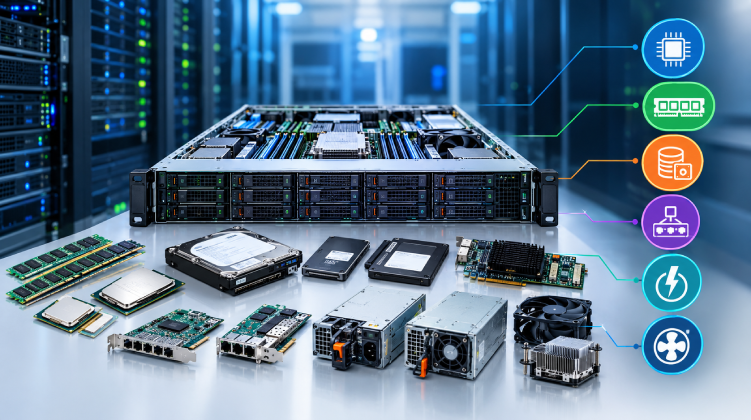

A server rarely fails all at once. More often, one worn part, such as a drive, a fan, or a memory module, starts the slide toward downtime. Knowing what each component does, and how to source the right replacement, is one of the most practical skills an IT team can have.
This guide covers the core components inside an enterprise server, the failure patterns to watch for, and how to buy parts without introducing compatibility or reliability problems.
Why Server Components Differ From Desktop Parts
A server is built for continuous operation, often 24 hours a day for years. Its components are engineered to match:
- Error correction: Server memory and storage controllers detect and fix data errors that desktop hardware would pass along silently.
- Redundancy: Hot-swappable drives, dual power supplies, and redundant fans let a single part fail without taking the system offline.
- Firmware integration: Vendors like Dell and HPE validate parts against their own management tools, so the server can report a failing component before it causes an outage.
Fitting consumer-grade parts into a server may save money upfront, but it often voids support agreements and creates instability that is hard to diagnose.
The Core Server Components
Processors (CPUs)
Server CPUs, such as Intel Xeon and AMD EPYC, offer high core counts, large caches, and support for multiple sockets and large memory capacities. When evaluating a CPU, look beyond clock speed:
- Core and thread count relative to your virtualization or database load
- Memory channels and supported speeds, which cap how fast your RAM can run
- Thermal design power (TDP), which affects cooling and power planning
CPUs are also tied to the motherboard socket and chipset, so upgrades are usually limited to the same generation.
Memory (RAM)
Enterprise servers use ECC (Error-Correcting Code) memory, usually in registered (RDIMM) or load-reduced (LRDIMM) form. These modules support much higher capacities than desktop memory and correct single-bit errors on the fly.
Three rules prevent most memory problems:
- Match the module type (RDIMM with RDIMM) and avoid mixing speeds or ranks.
- Populate slots in the order the manufacturer specifies to keep all memory channels balanced.
- Use modules validated for your server generation.
Storage: HDDs and SSDs
Storage is the component most likely to need replacement, because drives have the highest physical wear.
- Enterprise HDDs (SAS or nearline SATA) offer large capacities at a lower cost per terabyte, which suits archives, backups, and bulk data.
- Enterprise SSDs deliver far lower latency and higher IOPS, which suits databases, virtualization hosts, and transactional workloads.
Check the drive’s endurance rating and its intended workload (read-intensive, mixed-use, or write-intensive). Also confirm the form factor and interface, such as 2.5″ or 3.5″, and SAS, SATA, or NVMe, against your backplane.
RAID Controllers and Host Bus Adapters
The RAID controller sits between your drives and the operating system. It manages redundancy, rebuilds failed drives, and often adds a cache with battery or flash-based protection. A controller failure can make an entire array inaccessible, so firmware version and cache health deserve regular attention.
Power Supply Units (PSUs)
Most rack servers ship with redundant, hot-swappable PSUs. Key points when choosing replacements:
- Wattage must cover your fully loaded configuration, including future drives and add-in cards.
- Efficiency rating (80 PLUS Platinum or Titanium) lowers electricity and cooling costs over time.
- Input voltage and connector type must match your rack PDU.
Cooling Fans and Heat Sinks
Heat is the quiet cause of many hardware failures. Fans in a server run constantly, and a worn bearing can cause rising temperatures long before an alert fires. Replace failing fans promptly and keep blanking panels installed, since empty bays disrupt airflow.
Network Interface Cards (NICs)
Onboard ports are often enough for basic workloads, but add-in NICs matter for storage networks, virtualization clusters, and high-throughput applications. When selecting one, consider port speed (1/10/25/100GbE), offload features, and whether it uses SFP+ or RJ45 connections.
Warning Signs a Component Is Failing
Catching problems early is cheaper than recovering from an outage. Watch for:
- Predictive failure alerts from the server’s management controller (iDRAC on Dell, iLO on HPE)
- Rising correctable memory errors in system logs, which often precede a DIMM failure
- Increasing drive reallocated sectors or SMART warnings
- Fan speed anomalies or recurring thermal warnings
- Unexpected reboots under load, which can point to a PSU or memory issue
Make a habit of reviewing management logs weekly rather than waiting for a hard failure.
How to Buy Server Components Without the Guesswork
Compatibility and authenticity are the two biggest risks when sourcing parts. Before you purchase, work through this checklist:
- Identify the exact server model and generation, not just the brand.
- Confirm part numbers against the vendor’s compatibility documentation.
- Check firmware requirements, since some drives and controllers need specific versions.
- Verify warranty terms and whether the supplier offers replacement support.
- Prefer suppliers with direct experience in enterprise hardware, not general electronics retailers.
For teams in Bangladesh, local availability also matters. A supplier with stock in-country can shorten repair windows from weeks to days. Datacom offers a range of enterprise server components covering memory, storage, and other parts for leading server brands, which helps teams source validated hardware without long import delays.
Planning a Spare-Parts Strategy
Even well-maintained servers will eventually need replacements. A simple spares plan reduces downtime:
- Keep spares of high-wear items: drives, fans, and at least one PSU per server model in use.
- Standardize on fewer server models so spares cover more systems.
- Document part numbers and firmware versions for every machine.
- Review the plan annually as hardware ages out of vendor support.
If your infrastructure is approaching end of life, compare the cost of ongoing component replacement against a refresh. Teams planning either path can find genuine enterprise IT hardware suited to both upgrades and new deployments.
Final Thoughts
Server components are designed to work together as a validated system. The most reliable infrastructure comes from matching parts to your server model, monitoring health data before things break, and sourcing from suppliers who understand enterprise hardware. Get those three habits right, and most failures become scheduled maintenance rather than emergencies.